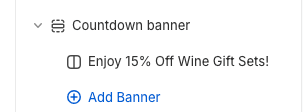
Countdown banner
Sections refer to customizable and reusable blocks of content that make up the structure of a webpage. Sections allow you to easily manage and organize the layout of your online store without the need for extensive coding. Each section typically represents a distinct portion of a webpage, such as a product grid, featured collection, or promotional grid.

The dynamic showcase of exclusive offers and featured promotions with a countdown timer. Explore a curated selection of discounts, special deals, and seasonal highlights that are all about timing.
How to set up the Promotional grid section
- Open Theme Editor and navigate to the Template section on the left side.
- Click the ‘Add section‘ button and click ‘Countdown banner‘ from the list.
- Add a new banner block by clicking ‘Add Banner‘