Hero
Sections refer to customizable and reusable blocks of content that make up the structure of a webpage. Sections allow you to easily manage and organize the layout of your online store without the need for extensive coding. Each section typically represents a distinct portion of a webpage, such as a product grid, featured collection, or promotional grid.

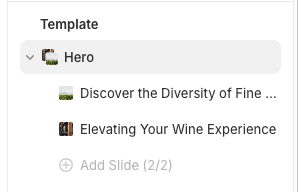
The Hero you can see on our homepage is that striking banner right at the top on the homepage meant to instantly catch your eye and make a memorable first impression. Its job is to grab your attention, share important messages, and showcase our brand in style. You have the flexibility to add two different slide blocks to the Hero, which will appear with a captivating scroll parallax effect. Want to make it your own? Feel free to customize by adding a slide block to the hero.
How to set up the Hero banner section
- Open Theme Editor
- Choose Homepage from the top dropdown.
- Navigate to the Template section on the left side, and click on Hero.
- Add Slide block.