Skip to content
Moodboard Creations
  • Themes
  • Partner programme
Support
← Guides

Search bar

Theme
Vincent →
Section
Theme Configuration
Full documentation
Vincent docs ↗
Still stuck?
Contact support

More in Theme Configuration

  • Theme customization options
  • Header and Footer setup
  • Announcement bar
  • Newsletter popup
  • Age verification
  • Languages & Currencies

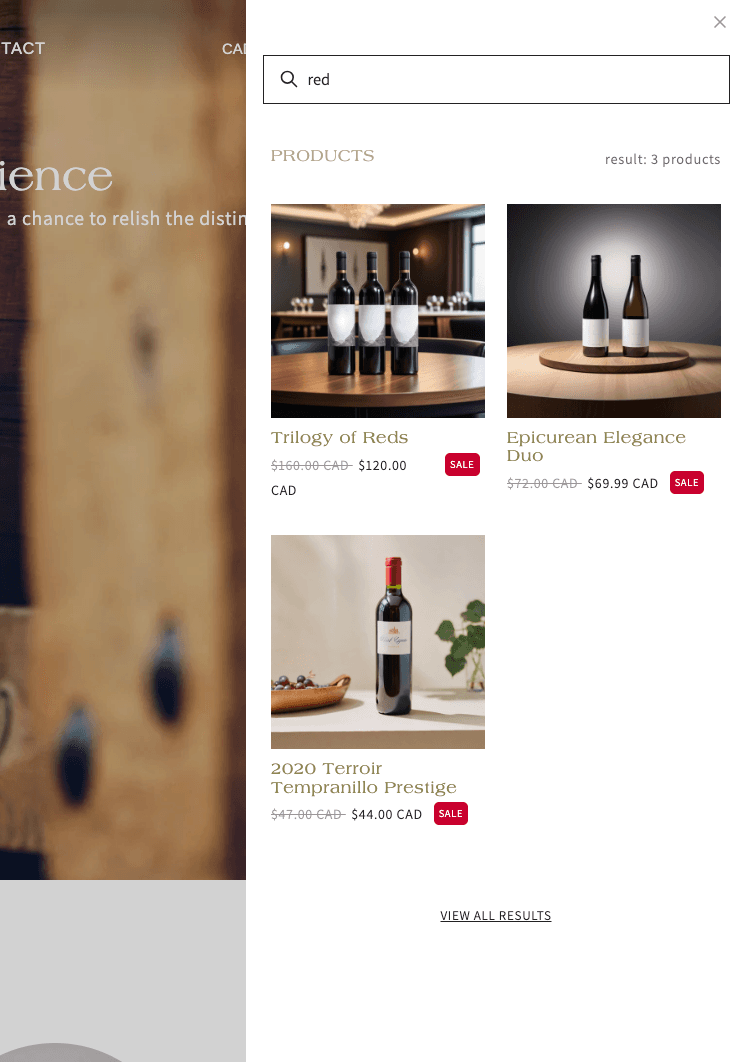
How to configure the search sidebar

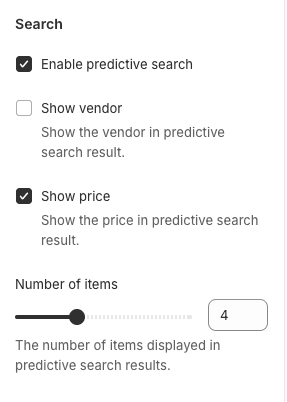
  1. Open the Theme Editor and navigate to the Header section within the Header Group.
  2. Enhance the user experience by clicking ‘enable predictive search‘.
  3. Tailor search results by clicking ‘Show vendor‘ and ‘Show price‘.
  4. Adjust the ‘number of items‘ to determine how many search results you’d like to display.
← Announcement barNewsletter popup →
Moodboard Creations

Shopify themes, designed with intent.

Explore

  • Themes
  • Partner programme

Support

  • Contact support
  • Vincent documentation
  • Agnes documentation

© 2026 Moodboard Creations. All rights reserved.

  • Support policy
  • Refund policy